How to Reduce Color Variation When Printing with Mimaki UV Inks
Getting consistent color across different printing materials isn't always easy. You can print a job that looks great on vinyl, switch to another material, and suddenly the colors look darker, duller, or slightly different.
It's a common frustration for wide-format print shops, especially when customers expect their colors to match across signs, displays, decals, and other printed products.
The good news is that most color variation can be managed once you understand what's causing it.
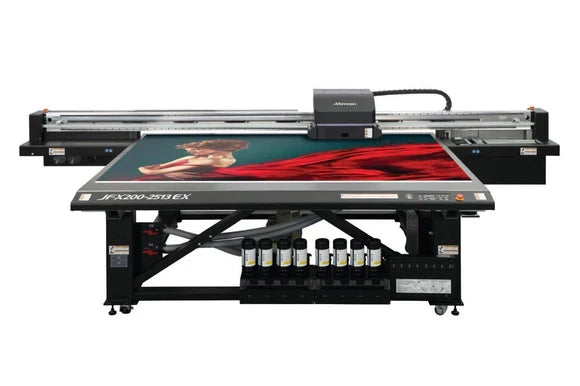
Whether you're running a Mimaki UCJV300, JFX200, or another UV printer, a few adjustments to your profiles, printer settings, and testing process can make a noticeable difference.
Let's look at what causes these color changes and what you can do about them.
1. Why Colors Look Different on Different Materials
One of the first things to understand is that ink doesn't look exactly the same on every surface.
Glossy white vinyl, for example, reflects light differently than a matte material. Clear acrylic introduces another challenge because the background behind the print can affect how the colors appear.
Several factors come into play:
-
Surface finish: Glossy, matte, and textured materials reflect light differently.
-
Material color: Printing on bright white material can produce a different result than printing on an off-white or colored surface.
-
Surface coatings: Different coatings affect how ink spreads and adheres.
-
Transparency: Clear and translucent materials may need white ink or a backing layer to achieve the desired color appearance.
This is why a color that looks perfect on one substrate may need some adjustment when printed on another.
Our advice: Always test important colors on the actual material you'll be using for the finished job. A small test print can save you from wasting an entire sheet or roll of material.
2. Make Sure You're Using the Right ICC Profile
If you're having trouble matching colors, your ICC profile is one of the first things worth checking.
An ICC profile helps your printer reproduce colors based on the printer, ink, and material you're using.
A profile that works well with one type of vinyl may not produce the same results on acrylic or another substrate.
Here are a few things to check:
-
Are you using the correct profile for the material?
-
Does the profile match your printer and ink configuration?
-
Are your RIP settings correct?
-
Have you changed inks, materials, or print settings since the profile was created?
It's also worth keeping a record of the profiles and settings that work best for your most frequently used materials.
That way, when a customer reorders a job several months later, you're not starting from scratch.
Will Switching to Alternative Mimaki Ink Affect My Color Profiles?
This is a question worth asking before changing ink suppliers.
The answer depends on the ink.
Some compatible replacement inks are formulated to work closely with existing printing workflows. However, that doesn't guarantee that every color will match the original ink exactly.
Before switching, confirm the ink's compatibility and any recommended changeover procedures with your supplier.
Once the new ink is installed, run test prints and compare the results with your existing color standards.
If the colors are within your acceptable tolerances, your current profiles may still work. If not, you may need to adjust or rebuild them.
The important thing is to verify the results rather than assume a profile change is always necessary.
3. Check Your Printer Before Changing Your Colors
Sometimes what looks like an ink or color-profile problem is actually a printer maintenance issue.
A partially blocked nozzle, incorrect alignment, or inconsistent printer settings can affect the finished print.
Before spending time adjusting colors, start with the basics.
Check these items first:
-
Run a nozzle test and look for missing or deflected nozzles.
-
Check printhead alignment if you're seeing quality problems.
-
Confirm that you're using the intended media and print settings.
-
Follow your printer's recommended maintenance procedures.
-
Print a known reference image to see whether the problem is consistent.
If a printer was producing accurate colors yesterday and suddenly looks different today, it's worth checking the equipment before making major changes to your color profiles.
Changing profiles to compensate for a maintenance problem can make troubleshooting more difficult.
4. Don't Overlook UV Curing
UV ink works differently from traditional solvent ink. Instead of relying primarily on evaporation for drying, UV ink cures through exposure to ultraviolet light.
That curing process is an important part of achieving the desired print characteristics.
If curing conditions aren't right for the ink and material, you may experience problems with adhesion, surface appearance, or durability.
For example, some materials require different printing or curing conditions than others.
When working with Mimaki UV printers:
-
Use curing settings recommended for the installed ink and printer.
-
Make sure the material is suitable for UV printing.
-
Test adhesion before committing to a large production run.
-
Follow the printer and ink manufacturer's operating recommendations.
Temperature and humidity can also affect printing conditions, so try to keep your work environment reasonably consistent.
One useful troubleshooting habit is to change only one setting at a time. If you adjust several things at once, it becomes much harder to determine what actually fixed the problem.
5. Understand the Differences Between Mimaki UV Ink Systems
Not every Mimaki UV printer uses the same ink. Before ordering a replacement, it's important to know which ink series your printer currently uses.
For example, the Mimaki UCJV300 series can use LUS-170 UV ink in supported configurations.
DPI-Supply offers Mimaki LUS-170 Replacement UV Ink in 1-Liter Bottles for compatible ink systems.
The Mimaki JFX200 family includes flatbed printers that use different UV ink formulations depending on the model and configuration.
For printers equipped with compatible LH-100 ink systems, DPI-Supply offers:
Other Mimaki UV printing systems may use flexible ink formulations, including:
These ink series are not interchangeable. Always confirm your exact printer model, installed ink series, and required ink format before purchasing.
You can compare the available options in our Mimaki UV Ink Collection.
6. A Simple Way to Test Color Before a Production Run
You don't need to make color testing complicated.
In fact, a straightforward testing routine can prevent many of the problems that lead to wasted ink, material, and production time.
Here's a practical approach:
Step 1: Check the material. Make sure you're using the correct substrate and that it's suitable for your printing process.
Step 2: Verify your printer settings. Confirm the ICC profile, print mode, and other important RIP settings.
Step 3: Print a small sample. Include the colors that matter most to your customer, especially logos and brand colors.
Step 4: Compare the results. Use consistent lighting and compare the sample with an approved reference.
Step 5: Check the finished print. Make sure the ink is properly cured and has acceptable adhesion.
Step 6: Save your settings. Record the material, profile, print mode, and other settings so you can repeat the job later.
For customers who require particularly accurate brand colors, using a spectrophotometer can provide a more reliable measurement than judging colors by eye alone.
A few minutes of testing can save a lot of frustration later.
7. Common Questions About Mimaki UV Color Consistency
Why do my colors look different on acrylic than on vinyl?
The two materials have different surface properties and reflect light differently. Their coatings, color, and opacity can also affect the final appearance. You may need separate profiles or print settings to achieve the closest possible match.
Why are my Mimaki UV prints coming out too dark?
Start by checking the ICC profile and RIP settings. Also consider the material you're printing on and the lighting used to evaluate the finished print. If the problem appeared suddenly, run a nozzle check before changing your color settings.
Can alternative UV inks produce consistent colors?
Yes, properly formulated and compatible alternative UV inks can produce consistent results. However, performance varies by product and printing conditions. Test any replacement ink against your shop's quality standards before using it for critical production work.
Do I need a different ICC profile for every material?
Not necessarily every individual material, but substrates with significantly different characteristics often benefit from separate profiles. Using a suitable profile for each media type helps improve consistency.
How can I reduce wasted material when matching colors?
Start with a small test print, use an appropriate profile, and record successful settings. This is generally less expensive than discovering a color problem after completing a large order.
8. Choosing the Right Ink Matters Too
Color profiles and printer settings are important, but the ink itself is also part of the equation.
When choosing replacement UV ink, consider compatibility, color consistency, adhesion, curing requirements, and supplier support.
At DPI-Supply, we offer alternative Mimaki UV inks for compatible printing systems.
Whether you're looking for LUS-series inks for supported flexible printing applications or LH-100 inks for compatible UV equipment, we can help you identify the appropriate product.
Alternative inks can offer an opportunity to reduce consumable costs, but they need to be the right match for your printer and the work you're producing.
DPI-Supply specializes in alternative inks and supplies for professional wide-format printers, including selected Mimaki, Roland, and Mutoh systems.
Our goal is simple: help print shops find quality replacement ink options at competitive prices without overlooking printer compatibility and dependable performance.
Explore our Mimaki UV Replacement Inks, or use our Printer Ink Compatibility Guide to help narrow down your options.
If you're considering a change, we're happy to help you identify the right product for your equipment.
Final Thoughts
Getting consistent color across different materials takes a little planning, but it doesn't have to be a constant struggle.
Start with the correct media profile, keep your printer properly maintained, pay attention to curing conditions, and test unfamiliar materials before running a full job.
Most importantly, keep a record of what works.
A good set of production settings can save time, reduce wasted materials, and make repeat orders much easier.
And when it's time to purchase replacement ink, make sure you're choosing a product that's compatible with your printer and the applications you're producing.
Looking for replacement UV inks or supplies for your Mimaki printer?
Shop Mimaki UV Inks at DPI-Supply, or contact DPI-Supply for help finding the right ink for your equipment.
DPI-Supply — Your Source for Quality Inks. Reliable Performance. Better Value.