Direct‑to‑film (DTF) printing has exploded in popularity because it allows print shops and hobbyists to decorate a wide range of fabrics with crisp, full‑color graphics. Despite the “just print it” appeal, the process involves specialized consumables and workflows. This article explores whether it’s feasible to use a regular printer for DTF transfers, how conversion kits work, and why dedicated DTF machines are often the best investment for serious production. Along the way, we’ll reference our go‑to supplier of Digital Printing Supplies, Digital Printing Inks, UV Inks and DTF Printers.
Understanding DTF Printing
DTF stands for “direct to film,” referring to the way designs are printed onto a PET (polyethylene terephthalate) film rather than directly onto the garment. Once printed, the design is coated with a hot‑melt adhesive powder and cured; the transfer is then heat‑pressed onto the fabric. Unlike dye‑sublimation (which works mainly on polyester) or DTG (direct to garment) printing, DTF can decorate cotton, polyester, nylon, silk, fleece, and blends without pretreating the fabric. The process uses water‑based CMYK inks and a white base layer, enabling vibrant colors on dark garments.
An article from Vispronet outlines the essential components for DTF printing: a printer with CMYK and white ink channels, flexible inks that resist cracking, PET film, adhesive powder, RIP software to manage color layers, and a heat press. It also explains that high‑resolution artwork files (150–300 DPI) and transparent backgrounds produce cleaner results. If you already have a Digital Printing Supplies shop, you might own some of these items; the key missing piece is a suitable printer.
Why You Can’t Just Use a Regular Printer
Standard home or office printers—whether laser or inkjet—are not built to handle DTF inks or films. Laser printers use toner and heat to fuse particles onto paper, which is incompatible with PET films and adhesive powder. Even pigment‑ink inkjet printers lack the necessary ink delivery and maintenance systems to manage thick DTF pigments.
The Winnerjet guide on converting printers notes that only printers with micro‑piezo printheads (e.g., many Epson models) can handle thick pigment inks; printers with thermal heads should be avoided because their ink‑heating mechanism “can clog or burn with thick ink”. The same guide states that compatible printers must support continuous ink supply systems (CISS) or refillable cartridges, allowing DTF inks to flow properly and preventing expensive single‑use cartridges from becoming a major cost.
Safety and Maintenance Issues
DTF printing involves handling fine adhesive powders and open inks. Dedicated DTF printers come with ventilation, white‑ink circulation systems to prevent settling, and self‑cleaning capabilities. Without these features, ink settling can cause nozzle clogging, and airborne powder can pose health risks if inhaled. The BCH Technologies overview of DTF inks emphasizes that environmental conditions like temperature and humidity significantly influence ink performance; high humidity can lead to ink separation and changes in consistency. It also stresses regular maintenance, including printhead cleaning and proper ink storage, to avoid clogged nozzles. Most consumer printers are not designed for that level of maintenance.
Can I Use a Regular Printer for DTF Transfers?
Using a regular printer for DTF transfers is a tempting hack. On paper, it seems plausible: print your design on film, shake on some powder, heat, and press. But the challenges quickly become apparent:
-
No white ink channels: Conventional inkjets print only CMYK; without white ink, designs on dark fabrics lack opacity and vibrancy.
-
Clogging and maintenance: DTF inks are thicker and settle quickly; most consumer printers lack agitation systems or self‑cleaning cycles and will clog if idle for a day or two.
-
Limited sheet size: Home printers accept letter‑size media, restricting the size of your transfers and reducing productivity.
-
Warranty voiding: Modifying a printer to run non‑approved inks and external ink tanks will void any manufacturer warranty.
Therefore, while small hobby projects might run on a converted printer, the print quality, durability, and workflow hassles often outweigh the savings.

How to Convert a Regular Printer to DTF?
If you still want to experiment with DTF on a consumer printer, a conversion kit can help. Winnerjet’s guide outlines the process:
Step‑by‑Step Conversion Process
-
Select a compatible printer: Choose a model with a micro‑piezo printhead (common in Epson EcoTank, L‑series, SureColor, or Stylus Photo models).
-
Install a continuous ink supply system (CISS): Replace the original cartridges with refillable bottles connected to the printhead.
-
Add a white ink setup: Dedicated white ink lines and dampers are required to manage white pigment and prevent cross‑contamination.
-
Replace the capping station: A new station is needed to handle thicker inks and to seal the printhead when idle.
-
Install DTF firmware or RIP software: The printer’s firmware must be unlocked or modified to recognize third‑party inks; the RIP software controls how CMYK and white layers are printed.
-
Assemble additional equipment: You’ll need DTF films, adhesive powder, curing oven or heat press, cleaning tools, and Digital Printing Inks.
When Conversion Makes Sense
Winnerjet concludes that conversion is a low‑cost entry for experimentation: it allows learning the process and testing designs with minimal investment. However, it cautions that the setup requires technical skills and that there’s no manufacturer support if something goes wrong. Converting may suit hobbyists or small‑scale users who accept the occasional clog and downtime.
What Printers Can Do DTF Transfers?
Not every printer can be converted to DTF, but a few categories stand out:
-
Epson EcoTank series (ET‑2720, ET‑2800, ET‑2850): These models use micro‑piezo heads and refillable tanks.
-
Epson SureColor P400/P600/P800: These professional photo printers have robust printheads and are popular conversion candidates.
-
Epson L‑Series and Stylus Photo: Older L805 or 1400 series models still use piezoelectric heads.
-
Select Canon, Brother, and HP models: A few Canon Pixma G‑Series or Brother DCP models can work, but Winnerjet notes that Canon and HP technologies are less compatible overall.
-
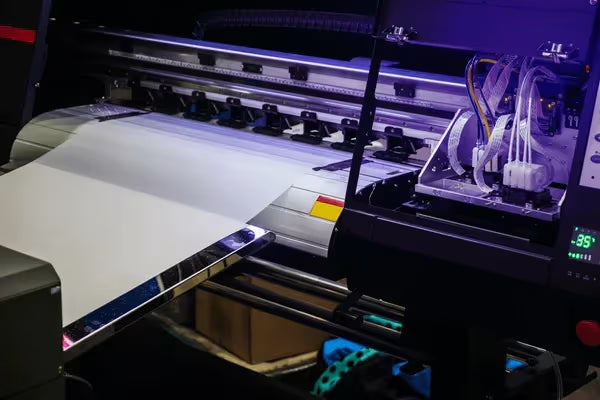
Purpose‑built DTF printers: Many vendors sell printers explicitly designed for DTF, often with dual printheads and roll‑feed capabilities.
While conversion kits exist for several models, you should always check if the manufacturer’s technology (piezo vs. thermal) can handle DTF inks. A good rule of thumb: if your printer does not already support pigment‑based inks and refillable tanks, it is unlikely to convert well.

Can I Put DTF Ink in My Epson Printer?
Some crafters wonder if they can simply pour DTF ink into their existing Epson, especially those with EcoTank systems. Theoretically, DTF inks share a pigment‑based chemistry similar to regular pigment inks, so they won’t instantly ruin the printhead. However, two critical differences complicate matters:
-
White ink: DTF ink sets include white pigment, which is thicker and heavier than color inks. Without circulation and agitation, white pigment settles and clogs lines and nozzles.
-
Ink viscosity and maintenance: DTF inks are formulated for film printing and have longer open times. Using them in a standard Epson without adjusting printhead voltage or cleaning cycles can lead to banding and nozzle failure.
Winnerjet notes that printers with micro‑piezo heads handle DTF ink better than those with thermal heads. Even with the right head, you still need a white ink system and regular maintenance routines to avoid clogs. The bottom line: if you put DTF ink in an Epson without proper modifications, expect inconsistent results and the need for frequent cleaning.
Benefits of Dedicated DTF Printers
While converting a printer can work for learning, a purpose‑built DTF printer provides numerous advantages:
-
High‑quality output: Dedicated machines use printheads designed for DTF inks and include dual channels for simultaneous color and white layers. Some printers, like the xTool Apparel Printer, feature dual Epson heads—one for CMYK and one for white—allowing high‑resolution prints quickly.
-
Roll‑feed support: Industrial DTF printers can handle continuous film rolls, which boosts productivity and reduces waste.
-
White ink circulation: Built‑in agitation and circulation prevent pigment settling, reducing the risk of clogging and ensuring consistent opacity.
-
Integrated powder application: Many models include an automated powder shaker and curing unit, streamlining the printing and adhesive process.
-
Safety and filtration: Dedicated units feature enclosed systems to handle adhesive powder and ink fumes safely.
Vispronet’s step‑by‑step guide underscores that DTF printers should have six ink channels (CMYK plus white) to produce vibrant prints. Their process also highlights that the printer applies color first and then a white layer, followed by powder, curing, and heat pressing. Machines built specifically for this workflow manage each step efficiently.
A Table Comparing Options
| Printer Type | Pros | Cons |
|---|---|---|
| Converted Inkjet | Low upfront cost, repurposes existing equipment, good for testing ideas | Requires technical modifications; no white ink out of the box; frequent clogs; slow printing; warranty voided |
| Dedicated DTF Printer | Designed for DTF inks; dual printheads for color and white; roll‑feed capability; integrated powder and curing; reliable output | Higher initial investment; requires space and proper ventilation |
| Regular Laser/Inkjet Printer | Cheap and easy to find | Cannot handle DTF inks or adhesive powder; no white ink; prints will fail |
When evaluating these options, consider whether you need occasional transfers or plan to produce shirts commercially. In most business scenarios, the higher productivity and reliability of a dedicated printer justify the cost.
Choosing Between Conversion and Dedicated DTF Solutions
So, can you do DTF on a regular printer? The answer depends on your goals. If you’re a hobbyist exploring the technique, converting an Epson EcoTank might be a fun project. The conversion guide suggests that such a setup is cost‑effective and allows you to learn the mechanics.
However, serious production requires reliability. Winnerjet cautions that DIY setups offer no manufacturer support and that troubleshooting clogs or firmware issues can be time‑consuming. Meanwhile, Vispronet’s guide confirms that professional DTF printing requires a printer with CMYK and white channels, adhesive powder handling, and proper curing. For a small business, investing in a dedicated machine ensures speed, consistency, and long‑term savings.
For more detailed instructions on printing your own transfers, check out this repair guide on How do I print my own DTF? It provides practical steps and troubleshooting tips for keeping your DTF printer in top shape.
Final Thoughts on Can You Do DTF on a Regular Printer?
After exploring the workflow, equipment, and pros and cons, the verdict is clear: while it’s technically possible to convert a regular printer for DTF use, the process is complex, maintenance‑heavy, and best suited for experimentation. If you’re decorating shirts as a side project or learning the craft, a conversion kit can get you started.
For anyone planning to sell DTF transfers or operate a print shop, a dedicated DTF printer is the wiser choice. It delivers superior print quality, supports continuous production, reduces clogging, and integrates safety features. Equip yourself with high‑quality Digital Printing Supplies, Digital Printing Inks, UV Inks and DTF Printers to ensure you achieve brilliant and durable results every time. For an in‑depth overview of the DTF process, the Vispronet article provides a comprehensive guide on DTF printing worth reading.