How Often Should You Clean a Wide-Format Printer to Prevent Clogs?
If you've been running a wide-format printer for any length of time, you probably know how frustrating clogged nozzles and printhead problems can be.
I've worked in the printing industry most of my life, including 38 years in screen printing before moving into digital printing in 2010. I'm a certified Mimaki technician, trained at Mimaki, and I also became a certified Roland technician in 2018.
Over the years, I've seen how something as simple as poor maintenance can turn a perfectly good printer into an expensive problem.
I have a saying I've used with other technicians:
"Did you run it? Clean it."
That doesn't mean you need to perform a deep cleaning every afternoon. It means taking care of your printer, keeping the designated maintenance areas clean, and following the manufacturer's recommended procedures.
A few minutes of proper maintenance can save you hours of frustration and potentially thousands of dollars in repair costs.
How Often Should You Clean Your Wide-Format Printer?
My recommendation is to inspect your printer daily when it's being used regularly.
Some printers need daily manual cleaning, while others rely more heavily on automatic maintenance systems and alert you when additional cleaning is required.
Here's a general maintenance schedule I recommend as a starting point:
| Maintenance task | Recommended frequency |
|---|---|
| Nozzle check | Daily before production |
| Inspect for ink residue | After each production day |
| Inspect wipers and caps | Daily where accessible and recommended |
| Check waste ink system | As indicated by the printer |
| Detailed manual cleaning | According to manufacturer instructions |
| Inspect maintenance components | Weekly or at service intervals |
| Replace worn parts | As needed or when scheduled |
These are general guidelines, not universal requirements. Your printer's maintenance manual should always take priority.
One important thing I want to point out is that daily maintenance doesn't mean running repeated automatic printhead cleaning cycles.
Those cycles consume ink, and unnecessary cleaning can increase operating costs without solving the underlying problem.
Why Do My Printer Heads Keep Clogging?
When a printer starts dropping nozzles, dried ink or accumulated residue may be the problem, but those aren't the only possible causes.
I've also seen printing problems caused by dirty caps, worn wipers, air entering the ink system, and problems with ink delivery.
Sometimes the printhead itself is damaged.
That's why I recommend checking your nozzle test and inspecting the appropriate maintenance components before assuming the printhead needs replacing.
Here are some common causes of missing nozzles and printing problems:
-
Infrequent printing: Ink can dry or settle when the printer sits unused.
-
Dirty capping stations: Residue can interfere with the cap's ability to seal correctly.
-
Worn wipers: Damaged or contaminated wipers may leave residue behind.
-
Incorrect cleaning solutions: Incompatible chemicals can damage components.
-
Poor environmental conditions: Excessive heat, dust, or unsuitable humidity can affect performance.
-
Ink quality problems: Poor or unstable formulations can create additional maintenance problems.
I've also encountered DTF inks that initially performed well but developed problems after several weeks of use. In some cases, problems with white ink stability contributed to expensive printhead issues.
That's why I believe dependable ink and regular maintenance need to work together.
How Often Should You Print to Prevent Clogging?
Regular printing can help keep ink moving through the system, but there's no single rule that applies to every wide-format printer.
Some machines have automatic circulation and maintenance systems that operate while the printer is idle.
Others need more frequent attention, particularly printers using white ink or specialized formulations.
If you're running your printer daily, I recommend starting production with a nozzle check.
If the printer has been sitting unused for several days, check its condition and follow the manufacturer's startup instructions before printing a large job.
Another important point: don't automatically shut off all power to your printer when you're finished.
Some machines need standby power to perform automatic maintenance. Turning them off incorrectly can create problems.
Always follow your printer manufacturer's recommendations for shutdowns and extended storage.
What Should Be Included in Daily Printer Maintenance?
 The goal of daily maintenance is to keep the areas that collect ink residue clean without damaging sensitive printer components.
You don't need to take your printer apart every day.
You do need to know which areas require attention and how to clean them correctly.
Watch: Official Roland and Mimaki Maintenance Videos
If you're unsure about the proper cleaning procedure, I recommend watching the manufacturer's instructions before starting.
Roland TrueVIS VG2/SG2 Manual Cleaning
Watch Roland's Official VG2 Maintenance Video
This video demonstrates the maintenance procedure for the Roland TrueVIS VG2 series.
Mimaki Printer Maintenance
Watch Mimaki's Official Maintenance Videos
Mimaki provides videos covering daily maintenance, wiper cleaning, capping stations, nozzle washing, and other procedures for specific printer models.
Remember that cleaning procedures can be different even between printers made by the same manufacturer.
Inspect the Printheads and Surrounding Areas
One thing I've learned from servicing printers is that small amounts of ink residue can become larger problems when they're ignored.
During printing, some ink mist can collect around the printhead carriage and maintenance components.
Over time, that residue can build up.
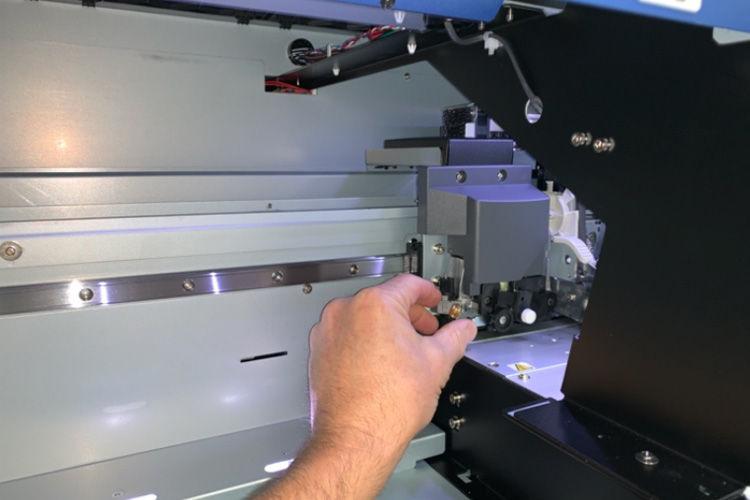
I recommend inspecting the approved cleaning areas regularly and removing residue according to the manufacturer's instructions.
Be careful around the printhead itself.
Never scrape, rub, or wipe the nozzle plate unless the manufacturer specifically instructs you to perform that procedure.
A printhead is an expensive component, and improper cleaning can damage it.
Check the Wipers and Capping Station

The wipers and capping station are two maintenance components I pay particular attention to.
The wiper helps remove unwanted material from the printhead surface.
The capping station helps protect the nozzles when the printer isn't operating.
If the cap becomes dirty or doesn't seal properly, ink can dry around the nozzles.
If a wiper becomes worn or contaminated, it may leave residue behind instead of removing it.
Both conditions can contribute to printing problems.
Watch: Mimaki Wiper and Capping Station Cleaning
Mimaki has an excellent collection of maintenance videos showing how these parts should be cleaned on compatible printers.
Watch Mimaki CJV300/CJV150 Daily Maintenance Videos
The videos demonstrate cleaning the wiper, capping station, and surrounding printhead areas.
Be sure to follow the procedure for your specific printer.
Use the Correct Cleaning Solution
This is another area where I see people make mistakes.
Not every printer uses the same type of ink, and not every cleaning solution is interchangeable.
Eco-solvent, UV, latex, and water-based DTF systems can require different cleaning products and procedures.
Using the wrong cleaning solution can damage seals, printer components, or printheads.
I always recommend using a cleaning solution approved for your particular printer and ink system.
At DPI-Supply, we carry printer inks, parts, and maintenance supplies for compatible Roland, Mimaki, and Mutoh equipment.
If you're unsure which cleaning solution to use, contact us before purchasing.
How Can You Tell if a Printhead Is Clogged?
Most of the time, your printer will give you warning signs before a nozzle problem becomes severe.
The first indication is often a change in print quality rather than an error message.
Here are some common symptoms:
-
Missing or broken lines in a nozzle test

-
Horizontal banding across printed graphics
-
Faded or inconsistent colors
-
Missing portions of printed images
-
Recurring defects in the same areas
-
Nozzles that continue dropping out after normal cleaning
One of the simplest things you can do is run a nozzle test before starting production.
It only takes a short time and can help you avoid wasting expensive printing material.
What Should You Do When a Nozzle Check Fails?
When a nozzle test shows missing or deflected nozzles, don't immediately assume you need a new printhead.
Start with the normal cleaning procedure recommended by your printer manufacturer.
Afterward, run another nozzle test and compare the results.
If the problem continues, inspect the approved maintenance areas and follow the troubleshooting instructions for your printer.
I don't recommend repeatedly running aggressive cleaning cycles without understanding the problem.
If the issue is caused by air entering the system, poor cap sealing, electrical damage, or another mechanical problem, repeated cleaning may not help.
You could simply be wasting ink.
Watch: Mimaki Nozzle Washing and Troubleshooting
Mimaki offers instructional videos covering nozzle washing and other maintenance procedures for compatible models.
Watch Mimaki's Official Nozzle Maintenance Videos
Nozzle washing procedures vary by model. Always use the correct cleaning fluid and follow the manufacturer's instructions before attempting advanced maintenance.
If normal cleaning doesn't restore the missing nozzles, it may be time to contact a qualified technician.
Which Wide-Format Printer Clogs the Least?
I get questions about printer reliability, and I don't believe there's one machine that's automatically the best choice for every print shop.
Some printers have more advanced automatic maintenance systems than others.
Certain machines can perform automatic nozzle checks, ink circulation, or scheduled cleaning.
Those features can certainly help, but they don't eliminate the need for proper maintenance.
White ink systems, particularly DTF printers, often require additional attention because pigment settling can affect performance.
When comparing printers, I recommend looking beyond the purchase price.
Consider the maintenance requirements, replacement parts, printhead costs, ink availability, and technical support.
A less expensive printer isn't necessarily cheaper to operate if it frequently needs repairs.
How Long Should a Wide-Format Printer Last?
A well-maintained wide-format printer can remain productive for many years.
However, there's no universal lifespan that applies to every make and model.
The actual service life depends on production volume, operating conditions, maintenance history, replacement part availability, and repair costs.
Printheads and other maintenance components may need replacing long before the printer itself reaches the end of its useful life.
And replacing a printhead can get expensive.
Depending on the printer, replacement costs can run into hundreds or thousands of dollars once you include the part and service.
That's before considering downtime, wasted materials, and delayed customer orders.
I've always believed that proper maintenance is one of the least expensive ways to protect your printing equipment.
How Can You Reduce Printhead Clogs and Maintenance Costs?
After years of working with different printers and ink manufacturers, I've learned that consistent maintenance is one of the most important things a print shop can do.
Even high-quality ink can't make up for neglected equipment.
Here are a few habits I recommend:
-
Make nozzle checks part of your normal production routine.
-
Follow the correct cleaning schedule for each printer.
-
Keep approved cleaning solutions and maintenance supplies available.
-
Inspect wipers, caps, and other maintenance parts regularly.
-
Replace worn components when necessary.
-
Store ink according to the manufacturer's recommendations.
-
Keep a written maintenance log.
-
Make sure everyone operating the printer understands the proper procedures.
If several employees use the same equipment, a maintenance log can be especially valuable.
It helps everyone know what has been cleaned, when a problem started, and which troubleshooting steps have already been performed.
The best maintenance routine is one that's appropriate for the printer and followed consistently.
Keep Your Wide-Format Printer Running With DPI-Supply
If there's one thing I hope you take away from this article, it's that regular printer maintenance is worth the effort.
I've spent 38 years in screen printing and have been involved in digital printing since 2010. I'm a certified Mimaki technician trained at Mimaki, and I became a certified Roland technician in 2018.
That experience has taught me how important it is to take care of your equipment before small problems turn into expensive repairs.
My advice remains simple:
"Did you run it? Clean it."
That means checking your printer, following the proper maintenance procedures, and taking care of problems before they get worse.
At DPI-Supply, we offer alternative inks, printer parts, and maintenance supplies for compatible Roland, Mimaki, Mutoh, and other wide-format printing systems.
If you need help finding the correct ink or maintenance supplies for your printer, we're here to help.
Visit DPI-Supply for Printer Inks, Parts, and Supplies
Thanks for reading. I hope these recommendations help you keep your printer running reliably and avoid unnecessary downtime.
Monty Hand
Owner, DPI-Supply
Certified Mimaki Technician — Trained at Mimaki
Certified Roland Technician — 2018
Quality Inks. Reliable Performance. Better Value.