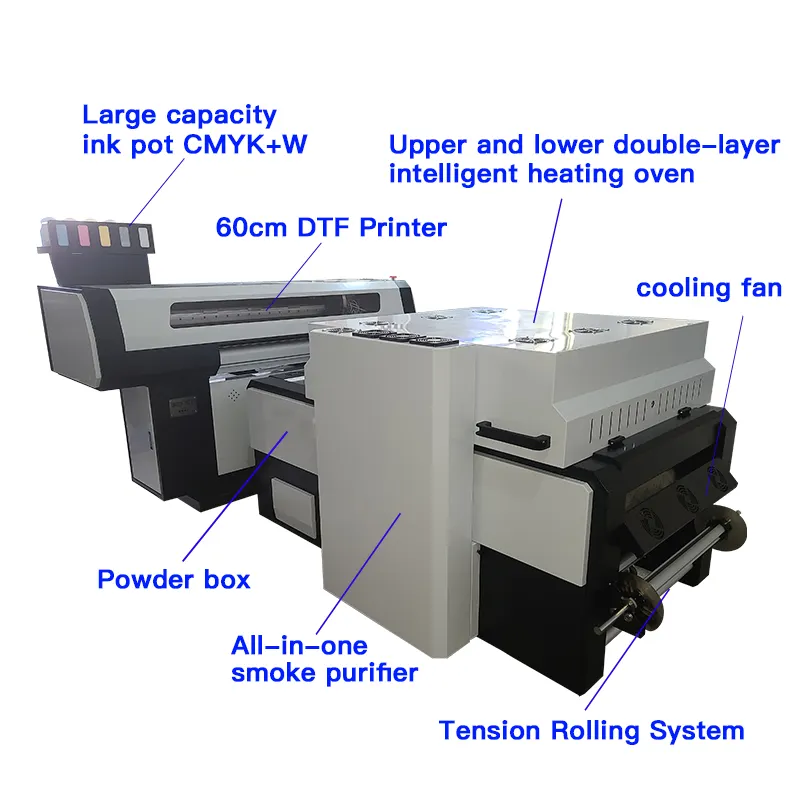
Introduction to Ink Tank Printers
Ink tank printers have become a common sight in homes, offices, and studios. These devices swap disposable cartridges for large, refillable reservoirs that hold enough ink for thousands of pages. The appeal is obvious: lower running costs, fewer plastic cartridges in landfills and the convenience of printing for months without a refill. As someone who regularly buys Digital Printing Supplies for creative projects, I appreciate the flexibility these printers promise. They have also attracted major manufacturers like Epson, Canon and HP, who market their EcoTank, MegaTank and Smart Tank lines as smarter alternatives to cartridge‑based systems.
On paper, ink tank models look like a no‑brainer. The ink bottles themselves cost about the same as a pair of cartridges but deliver vastly higher yields. Many buyers also like that there are fewer moving parts—no printhead built into each cartridge means less electronic waste. Newer models support wireless printing, scanning and copying in a compact unit. When you’re stocking up on Digital Printing Inks, it’s hard to ignore the promise of printing 6 000 to 7 000 pages on a single set of bottles. But the picture isn’t complete without discussing the trade‑offs that come with this design.
Which is better, an ink cartridge or an ink tank? – What is the downside of an ink tank printer?
To decide between cartridges and tanks, you need to weigh cost against convenience and longevity. Traditional inkjet printers are inexpensive to buy and simple to maintain: you buy a machine for $50 or $100, snap in a pair of cartridges and start printing. Ink tank printers can cost several hundred dollars out of the box because the integrated reservoir system is built into the hardware. Those reservoirs add bulk to the chassis, so the machine tends to be larger and heavier than a comparable cartridge model. If your desk space is limited, that extra size may be a significant drawback.
Even after you’ve paid the higher entry fee, there are hidden expenses. Some tank printers have maintenance boxes that collect waste ink during cleaning cycles; these pads eventually fill up and must be replaced. Others track page counts and prompt a service shutdown when a preset limit is reached. Manufacturers advertise “two years of ink included,” but those yields often assume very light usage. Real‑world printing of photos and graphics drains ink much faster. Cartridges, by contrast, make it easy to budget because you replace a fixed amount of ink at predictable intervals. For people who rely on UV Inks or specialty media, the sealed design of cartridges can also be more reliable; some tank printers are difficult or impossible to convert for sublimation or edible‑ink printing.
Do ink tank printers dry out if not used? – What is the downside of an ink tank printer?

The integrated reservoirs that make tank printers economical can also be their Achilles heel. Unlike cartridges, which seal the ink until it is used, tanks continually feed ink through a series of tubes to the printhead. If you leave the machine idle for weeks or months, the ink can dry inside those lines and clog the nozzles. Humidity and temperature fluctuations accelerate evaporation, so a printer that sits in a hot office or an unheated garage is at greater risk. Clearing a dried printhead may require multiple cleaning cycles, wasting ink and time. In severe cases, you may need professional servicing or a replacement head.
From personal experience, printing a simple test page every few days is enough to keep the ink flowing. Many users schedule this as part of their workflow or set a calendar reminder. That discipline is essential if you only print occasionally. Cartridges, in comparison, keep unused ink in a sealed environment until you need it. If you’re running a craft studio with periodic bursts of activity—say when preparing for markets or exhibitions—a tank printer may need more attention than you expect. For a person who buys Digital Printing Supplies in bulk but only prints sporadically, the risk of clogging should be a major consideration.
How long does ink last in a tank printer?
Manufacturers advertise page yields in the thousands, and under ideal conditions those numbers are achievable. The capacity of the tanks means you can print hundreds of full‑colour photos or thousands of text pages before refilling. However, “up to two years of ink” often reflects very light coverage—around 20 % of the page. Printing borderless photos, high‑density graphics or heavy colour blocks consumes ink much faster. Additionally, routine cleaning cycles use ink, and each cleaning cycle flushes waste into the maintenance box. When the pad fills up, the printer may stop printing until it is replaced, adding to the long‑term cost.
In my studio, a set of bottles usually lasts around 18 months with moderate use. That’s impressive compared with cartridges, which we used to replace every few weeks. But the longevity of tank ink depends on regular use; letting a printer sit idle shortens the practical life of the ink because of clogs or evaporation. If you’re printing large banners on a DTF Printer, the cost per page can still be lower with tanks, but you must factor in the additional maintenance items like waste pads, printhead replacement and cleaning supplies.
Maintenance and Practical Considerations
Beyond clogging, there are other practical issues that come with ink tanks. The machines are built with more fragile printheads, which are considered consumable parts in some models. Replacement heads can be expensive, and installing them isn’t always straightforward. The integrated design also limits your flexibility; not all models allow you to swap in specialty inks like fluorescent or white. Cartridges, on the other hand, can be swapped or upgraded easily if you need to change ink formulations.
Mess is another overlooked factor. Refilling tanks requires a steady hand, and spills happen. Some bottles have smart nozzles, but a moment of distraction can leave ink stains on your desk and clothes. The reservoirs themselves are often translucent, so you must watch the levels to avoid running dry; letting air enter the lines can cause bubbles and print quality issues. With cartridges, you replace the entire unit, so there’s less chance of a spill. In a busy office environment or a classroom, the simplicity of cartridges can outweigh the savings of tanks. Even for a professional buyer of Digital Printing Supplies, it’s worth thinking about who will handle refills and how often.
Environmental Impact and Cost Considerations

One of the strongest arguments for tank printers is sustainability. Refillable systems generate far less plastic waste than disposable cartridges because you keep the same reservoirs and only top them up. The bottles themselves are smaller than cartridges and often recyclable. For users committed to reducing environmental impact, this is a meaningful benefit. Over time, the lower cost per page can translate into significant savings for high‑volume users. Many small businesses, art studios and schools find that the savings quickly offset the initial investment.
However, the eco‑friendly narrative doesn’t eliminate all waste. Maintenance boxes and printheads are consumables that eventually end up in the landfill. High initial cost can also be a barrier for students or families on a tight budget. If you print only a few pages per week, the return on investment may take several years. Cartridges may cost more per page, but the lower purchase price makes them accessible to more users. When weighing the ecological benefits, it helps to read detailed guides like Is eco‑solvent ink better than inkjet ink? to understand how different ink chemistries affect durability and environmental footprint.
What is better, an inkjet or an ink tank? – What is the downside of an ink tank printer?
The term “inkjet” describes the printing technology used in both cartridges and tank systems; the main difference lies in how the ink is delivered. Traditional inkjet printers with cartridges are typically faster, particularly when printing large volumes of text. They are also more compact and often compatible with a wider range of devices. If you rarely print colour pages and value speed, a laser printer might even be a better fit.
Ink tank printers shine when you need to produce lots of colour prints and want to lower your running costs. The print quality is comparable to cartridge models, and the per‑page expense drops dramatically over time. But the trade‑offs—slower speed, higher initial price, the risk of drying and clogging—shouldn’t be overlooked. Choosing between the two comes down to your printing habits and the value you place on convenience versus long‑term savings. For creative professionals ordering Digital Printing Inks in bulk, the economics favour tanks. For occasional home users or students with light workloads, cartridges or even a budget‑friendly laser printer might be the better choice.
Who should choose ink tank printers vs. cartridges?
Ink tank printers are best for people who print frequently. Small businesses producing marketing materials, teachers printing worksheets and artists making prints every week will all benefit from the lower cost per page. Because the ink lasts so long, there’s less worry about running out of supplies in the middle of a project. When you’re regularly restocking UV Inks or specialty media, the convenience of high‑capacity tanks is hard to beat. The environmental benefits are also significant if you’re mindful of waste.
On the other hand, casual users should think carefully. If you only print boarding passes and occasional photographs, the savings may never offset the higher purchase price. The risk of clogging increases if you let the printer sit for weeks at a time. Students or households with unpredictable printing patterns might be happier with an inexpensive cartridge printer or with using campus or library services. Businesses that require rapid, high‑volume output—such as copy shops or print farms—should look toward industrial solutions like UV or laser systems, as tank printers generally lack the speed and durability required for continuous operation.
Tips for getting the most from an ink tank printer
If you decide a tank printer fits your needs, a few practices will extend its life. First, print something weekly to keep ink flowing; even a small pattern test page is enough. Second, monitor the ink levels closely and refill before they are completely empty to avoid introducing air bubbles. Third, keep the printer in a climate‑controlled environment to reduce evaporation and prevent the ink from drying out. Finally, budget for consumables like maintenance boxes and, if necessary, replacement printheads. Following these steps helps ensure you enjoy the benefits of low‑cost printing without succumbing to the common downsides.